How to Choose the Perfect Linux Distribution for You

Linux is an operating system created in 1991 by a Finnish computer science student, who wanted to connect to the University Unix mainframe using his 386 PC.
At the time, the only Unix portability for PCs was the educational operating system called MINIX.
MINIX was a minimal UNIX-based operating system, created by renowned computer science professor Andrew S. Tanenbaum, in order to teach how operating systems work. The MINIX licensing at the time limited its use to educational purposes, among other limitations.
Initially, Torvalds based his work on MINIX to write his own Kernel and basic applications, taking advantage of many things from MINIX. Later, all the code was replaced by GNU Project components.
Torvalds wanted his creation to be called "Freax", a derivative of "Free", "Freak", and the "X" from Unix.
From the start, Linux was a sensation among programmers and technology enthusiasts, being distributed through FTP channels, discussion forums, and improved by various enthusiasts.
A few months after the public release of "Freax", Ari Lemmke, Torvalds' colleague, renamed the project to "Linux", with Linus' consent.
Today, the operating system created by Torvalds is widely used across the entire Internet infrastructure, in all supercomputers, and in almost all cell phones through its embedded version called Android.
This is largely due to the adopted software licensing, GNU GPL, which mandates free distribution of source code, allows its improvement, and requires free distribution of the improved new code.
Linux Distributions
Being an open-source operating system, Linux can be modified and customized by anyone or any company.
As a result, in the 90s, various groups emerged, both amateur and commercial enterprises, that customized Linux, creating their own distributions.
A Linux distribution consists of:
- Operating system kernel, called Kernel;
- GNU Project utilities;
- Service manager: System V or Systemd;
- Graphical environment: KDE, Gnome, XFCE, etc;
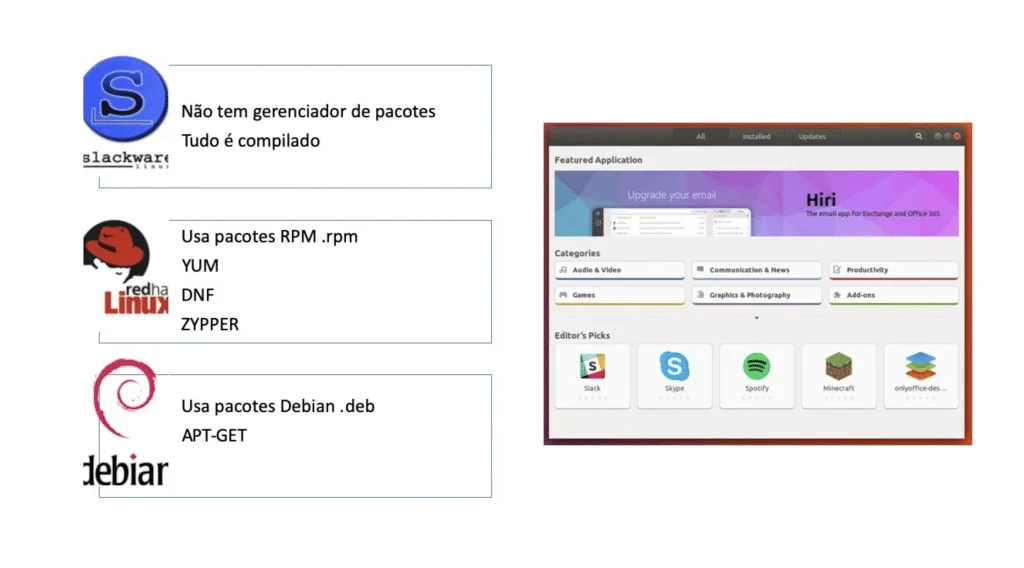
- Software manager.
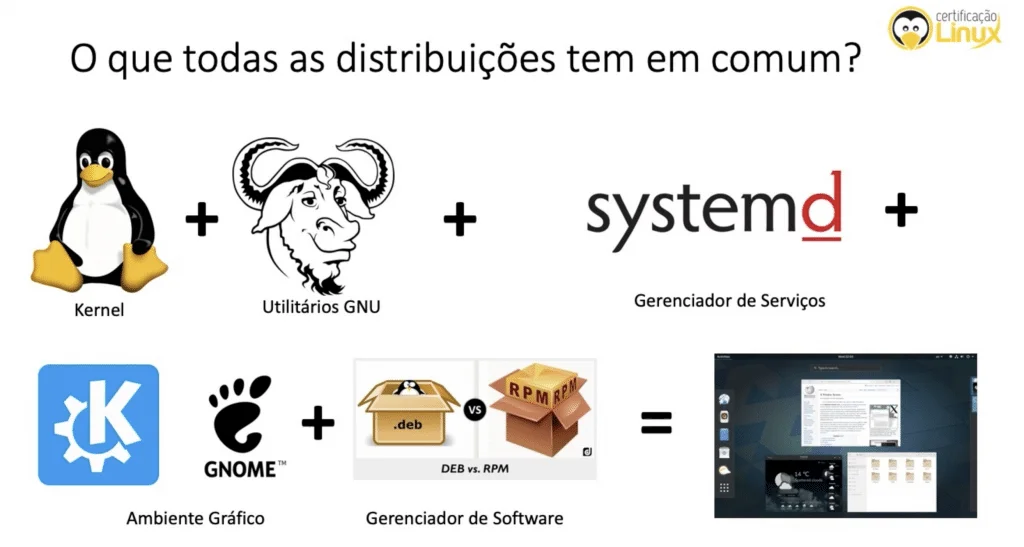
Each Linux distribution can modify any of these components, customizing to the taste of the user group, or for a specific purpose, or well-defined application.
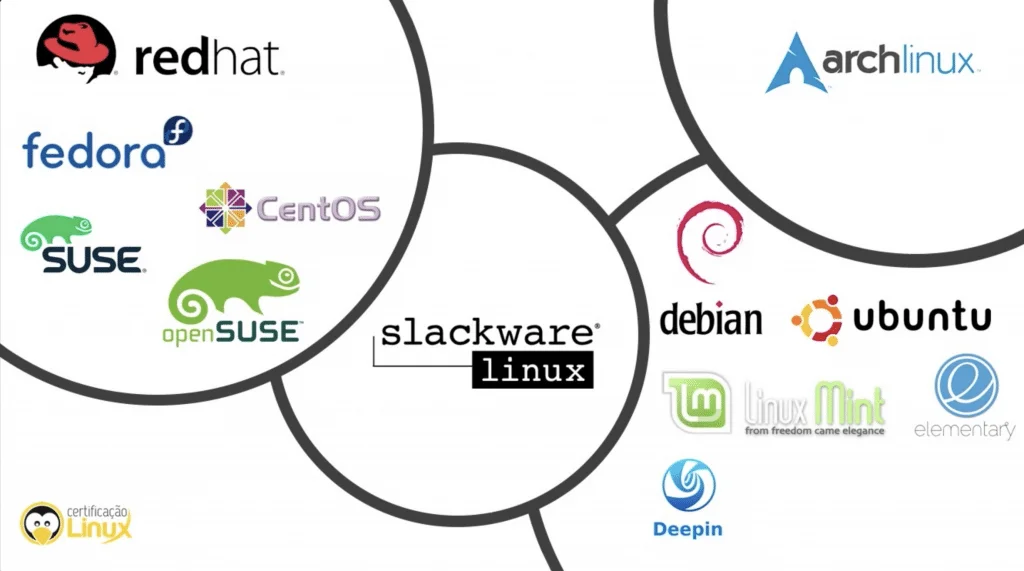
That's why there are distributions aimed at end users for Desktop use, like Fedora, Ubuntu, and OpenSuSE, which use friendly tools, robust graphical environment, and server-focused distributions, with the purpose of efficient use of computational resources, like Red Hat, Fedora for Servers, SuSe, and CentOS.
There's also the possibility to classify distributions by the distribution family they belong to. Essentially, there are two major families: Debian and Red Hat. Just because they are the oldest stable distributions, almost all other distributions existing in 2020 are based on one of them.
Released in 1993 by Ian Murdock, Debian is a Linux distribution that had thousands of volunteers, who shared Richard Stallman's ideals, regarding user freedom to use, distribute, and improve software.
In 2004, Mark Shuttleworth and his team, with the goal of making Linux as user-friendly as possible for Desktop users, improved Debian, making the learning curve for new users as small as possible, and from this work he created the Ubuntu distribution.
In 1994, the first completely Linux-based commercial company was created, called Red Hat Linux. Specifically aimed at enterprise applications, its Linux is focused on server use, and its annual revenue of over one billion dollars is maintained with support contracts. In 2019, Red Hat was acquired by IBM for 34 billion dollars. Not bad for a free software company.
From Red Hat, other distributions were born, like Fedora, focused on Desktops, and CentOS for servers. Fedora is maintained by Red Hat, and adopts new technologies quite quickly.
Another old Linux company is SUSE Linux, born in 1992 in Germany, a distribution known for its seriousness and also for its commercial SUSE Enterprise Linux for servers. In 2004, the company created OpenSUSE, a free and open source version of Linux, open to external developers. SUSE Linux became known for its software management tool called YaST, which greatly facilitates software installation, long before Debian and Red Hat created similar tools (apt and yum).
Embedded Systems
In the matter of embedded systems, Linux is also a champion, precisely because it has open source code, which facilitates adaptations and running on a huge range of processor architectures (x86, ARM, IA-64, m68k, MIPS, OpenRISC, PA-RISC, powerpc, s390, Sparc, etc).
Embedded systems are equipment created for a specific functionality, but which behind the scenes are a computer connected to specific interfaces. Examples include: automotive multimedia, smart TVs, autonomous cars, internet routers, medical instruments, industrial automation, navigation systems, etc.
Android
Without a doubt, with 2.5 billion active devices in 2019, Android is a very successful form of embedded Linux. Created in 2003, the company Android Inc. initially started developing a system to be used in digital cameras. In 2005, it was acquired by tech giant Google and became the most used operating system on mobile devices.
Android uses a modified version of the Linux Kernel, especially designed to work with small touchscreen displays. The Android project also includes a series of proprietary software from Google's applications, like Calendar, Maps, Mail, and Browser.
Raspberry Pi
The Raspberry Pi is a low-cost computer (US$25), the size of a credit card, with WiFi, USB inputs, HDMI, and sound. It also has various input and output interfaces, known as GPIO, which can connect to other electronic devices, extension boards, sensors, servo-motors, and other hardware. The Raspberry creators customized a version of Debian to run on the Raspberry, called Raspbian.
The Raspberry is one of the vectors of the growth of embedded devices, due to its versatility and price.
Linux in the Cloud
The term cloud computing was coined to designate the consumption of computational resources in distributed data centers, in public or private clouds. In 2017, it is estimated that 90% of cloud applications run on Linux.
The major cloud computing players are: Amazon Web Services (AWS), Google Cloud Platform, Rackspace, Digital Ocean, and Microsoft Azure. All of them offer various versions of Linux in their infrastructures.
How to Choose the Operating System?
The choice of a computer's operating system is usually made at the time of hardware purchase, since it is unlikely that a Desktop computer is sold without an operating system today.
It is with this premise that for more than 25 years Microsoft has strongly held the space of operating systems for IBM PC compatible Desktop computers.
Apple also provides its proprietary UNIX operating system on its computers, whether iMacs or MacBooks, called MacOS. On its phones, the Cupertino giant also runs a variant of UNIX, called iOS.
It is in the server market that Linux flourished, and holds a large part of the Internet ecosystem, and 100% of the world's supercomputers.
Although manufacturers almost always ship hardware with a pre-installed operating system, it is possible for the user to switch to an operating system of their choice that meets the necessary requirements.
Five years ago installing Linux on a Notebook was something experimental, and the chosen distribution was not always capable of identifying and making correct use of the hardware. But that has changed drastically today. It is perfectly possible to successfully install any major Linux distribution on virtually any notebook, without any malfunction issues.
Linux has even been a wise choice to revive old notebooks, with lightweight distributions, capable of running on old hardware.
How to Choose a Linux Operating System?
Linux can basically be divided into three categories: enterprise, consumer, and experimental.
Enterprise distributions may be free or commercial, generally involve a support contract, and provide a robust and thoroughly tested operating system, for enterprise applications and services.
The distributions in this category are:
There are end-user distributions, aimed at Desktop computers, such as:
- Ubuntu non LTS (Lubuntu, Xubuntu, Kubuntu, etc)
- OpenSUSE
- Fedora Workstation
- Elementary OS
- Zorin OS
- Linux Mint
- Deepin
There are also experimental distributions, for hackers and advanced users:
Life Cycle
Depending on the application that Linux will execute, it is important to consider the support life cycle of the operating system.
After the life cycle of a software version ends, the official developers discard any support, update, and bug fix for that particular version. The user's options in this case are: to make the fixes on their own, be left adrift, or upgrade the version.
The life cycle of Linux distributions may vary according to the category, and also the distributor. Enterprise versions usually maintain active support for a version for 10 years. This is necessary because in enterprise applications, changes are made cautiously and slowly. It is common today for hardware to become obsolete before the end of a software's life cycle.
Consumer-oriented distributions maintain support through forums, generally on the manufacturer's website, for a release period of three versions, which can generally last around 5 years.
Experimental versions, generally also have support via Wiki, which are built actively, always in motion.
Also, it is possible to find distributions that make beta versions of their systems available to the public, which have not been widely tested, and may contain several bugs, and do not enjoy maximum performance by including debugging routines. After numerous tests and fixes, the manufacturer releases a "stable" version.
Graphical Desktops
In its inception Linux was a simple shell in the Unix standard, and it was like that for a long time. It was something made by programmers for programmers, so being user-friendly and beautiful was not an important requirement.
But 5 years ago this narrative gave way to a beautiful operating system, with a variety of first-rate graphical environments and applications, culminating in a complete Desktop experience, with everything an inexperienced user can have at hand to work, communicate and have fun.
Without a doubt one of the beauties of Linux is its plurality of graphical environments for all tastes, through numerous distributions and yet maintain full compliance of being a standard operating system.
Over time several graphical environments have been built to work on the Linux window server.
Among them, we can mention the KDE, GNOME, XFCE and Cinnamon environments.
KDE
The KDE is a large community of developers since 1996 that develop a cross-platform graphical environment known as KDE Plasma. Its name comes from K Desktop Environment, and the letter "K" was chosen simply because it comes after "L" from Linux. KDE and its applications are written with the Qt framework.
The goal of the KDE community is both to provide an environment that offers applications and basic functionalities for daily needs as well as to allow developers to have all the necessary tools and documentation to simplify the development of applications for the platform.
KDE is based on the principle of ease of use and customization. Every element of the graphical environment can be customized: panels, window buttons, menus and various elements like clocks, calculators and widgets. The extreme flexibility for appearance customization allows themes to be shared among users.
The KWin window manager is responsible for providing an organized and consistent graphical interface, and intuitive taskbar.
 KDE Plasma with OSX Theme KDE Plasma with OSX Theme |
 KDE Plasma another OSX style variation KDE Plasma another OSX style variation |
 KDE Plasma Windows style KDE Plasma Windows style |
GNOME
GNOME (acronym for GNU Network Object Model Environment) is a free software project for a graphical environment also cross-platform with special emphasis on usability, accessibility and internationalization.
The GNOME Project is maintained by various organizations and developers and is part of the GNU Project. Its main contributor and maintainer is Red Hat.
GNOME 3 is the default graphical environment of major distributions such as Fedora, SUSE Linux, Debian, Ubuntu, Red Hat Enterprise, CentOS and many others.
There is also a fork of GNOME 2 known as MATE, since the change from GNOME 2 to GNOME 3 was significant, and some users simply preferred to stick with the more GNOME 2-like environment.
Created by two Mexicans in 1997, unhappy at the time with the lack of free software for the Qt Framework, used for developing applications for KDE.
This way, they preferred to use GTK (Gimp Tool Kit) as the standard framework for GNOME, since it was already GPL licensed.
GNOME 1 and 2 followed the traditional desktop with "taskbar".
GNOME 3 changed this with GNOME Shell, with an abstract environment where switching between different tasks and virtual desktops occurs in a separate area called "Overview".
 GNOME 3 on CentOS GNOME 3 on CentOS |
 GNOME 3 on Ubuntu GNOME 3 on Ubuntu |
 Figure 6 - MATE on Linux Mint Figure 6 - MATE on Linux Mint |
Xfce
Xfce is a desktop environment for Unix-like operating systems, such as Linux and BSD, founded in 1996.
Xfce aims to be lightweight, fast and visually appealing. It incorporates the Unix philosophy of modularity and reuse and consists of separate packaged parts that together provide all desktop environment functions, but can be selected in subsets to meet the user's needs and preferences.
Like GNOME, Xfce is based on the GTK framework, but it is a totally different project.
It is widely used in distributions that aim to be lightweight, especially designed to run on old hardware.
Xfce can be installed on various UNIX platforms, such as NetBSD, FreeBSD, OpenBSD, Solaris, Cygwin, MacOS X, etc.
Among the distributions that use Xfce, we can mention:
- Linux Mint Xfce edition
- Xubuntu
- Manjaro
- Arch Linux
- Linux Lite
 Xfce on Linux Mint Xfce on Linux Mint |
 Xfce on Linux Manjaro Xfce on Linux Manjaro |
Cinnamon
Cinnamon is a graphical desktop project derived from GNOME 2, created by the Linux Mint team. Its user experience is very similar to Windows XP, 2000, Vista and 7, making the learning curve easier for users who have migrated from these operating systems.
| Figure 9 - Cinnamon on Linux Mint |
Command Line
It is important to say that even with a beautiful, practical and diversified graphical environment, it is in the command line that Linux's strength lies. For advanced users, it is in the operating system shell that the magic happens, because Linux allows the user to do whatever they want, with the ease of changing a file. The concatenation of commands also allows creating true computational Swiss army knives.
Accessing the terminal is simple and quick. Just look for the Terminal application in the graphical environment, or press the key sequence Ctrl-Alt-F1...F2...F3.. to have access to the terminal.
Linux on Virtual Machines
It is impossible to talk about a computing environment without talking about virtualization and containers. The old data centers in companies have given way to cloud computing, with flexible environments.
The term cloud computing was first described in 1997 in ARPAnet documents, which was the computer network that preceded the Internet as we know it. It was designated to represent a large network of interconnected and geographically dispersed servers, so that each environment is self-sufficient and independent.
Popularized by major companies like Amazon Web Services (AWS), Microsoft Azure and Google Cloud Platform, the term cloud computing currently serves to designate distributed computing, where computational resources are shared and distributed to complete a given task or application.
Linux is perfectly adaptable to this type of computing environment, which seems like it was made for it, in a perfect symbiosis.
Despite having access to increasingly efficient and powerful hardware, operations executed on traditional physical servers - or bare-metal - inevitably face significant practical limitations.
The cost and complexity of creating and deploying a single physical server mean that effectively adding or removing resources to quickly meet demands is difficult or, in some cases, impossible. Add to the server cost the cost of power and cooling. Internet link cost and also the security of a good firewall.
Securely testing new configurations or complete applications before launch can also be complicated, expensive, and time-consuming.
In this regard, computing evolved to provide virtual servers, which can be created or destroyed in seconds, or even have the ability to rapidly increase and decrease their computing power.
This provides a unique advantage for corporate applications, which must meet constantly changing business needs.
Machine virtualization involves the following premises:
- Software access to hardware resources and drivers in a way that is indistinguishable from a non-virtualized experience;
- It must allow the client full control over the virtualized system's hardware.
- Allow physical computing, memory, network, and storage resources to be divided among multiple virtual entities.
- Each virtual device is represented in its software and user environments as a real and independent entity.
- When correctly configured, virtually isolated resources can provide more secure applications without visible connectivity between environments.
- Virtualization also allows new virtual machines to be provisioned and run almost instantly and then destroyed once they are no longer needed.
The type of adaptability that virtualization offers also allows scripts to add or remove virtual machines in seconds ... instead of the weeks it takes to purchase, provision, and deploy a physical server.
Container Virtualization
A VM is a complete operating system whose relationship with hardware resources (CPU, memory, storage, and network) is fully virtualized: it thinks it is running on its own computer.
A hypervisor installs a VM from the same ISO image that you would download and use to install an operating system directly on an empty physical hard drive.
A container, on the other hand, is, effectively, an application, launched from a script-like template, that considers an operating system.
In container technologies (such as LXC and Docker), containers are nothing more than abstractions of software and resources (files, processes, users) that depend on the host kernel and a representation of the "four main" hardware resources (for example, CPU, RAM, network, and storage).
A container is then a set of one or more processes organized in isolation from the system, with its own disk abstraction, network, and shared libraries. It has all the files necessary for executing the processes for which it was created. However, containers use the Host Kernel of the instances on which they run.
In practice, containers are portable and consistent throughout migration between development, testing, and production environments. These characteristics make them a much faster option than traditional development models, which depend on replicating traditional test environments.
Since containers are, effectively, isolated extensions of the host kernel, they enable incredibly lightweight and versatile computing opportunities.
DevOps and Containers
Containers are the perfect marriage between software development and infrastructure.
Containers allow replicating a production environment in development very easily, and vice versa. The entire environment created for developing an application can be migrated to production in seconds with minimal effort. All configurations, libraries, dependencies, files, location go along with the application encapsulated in the container with maximum portability, configurability, and isolation.
Containers are VMs?
Not exactly. The two technologies are complementary. With virtualization, it is possible to run operating systems (Windows or Linux) simultaneously on a single hardware system.
Containers, on the other hand, share the same host operating system kernel and isolate application processes from the rest of the system. This provides application isolation without the need to install a complete virtual machine. This way, "container instances" can be started, stopped, and restarted more quickly than a traditional VM
Think of containers as apartments in a building. Each family lives in a different apartment, with their own wall color, furniture, and appliances, but they share common areas such as the entrance hall, elevators, gourmet space, sewage system, water, and gas. Virtual machines, on the other hand, are like a housing development with multiple houses. Each house needs to have its own wall, garden, sewage system, heating, roof, etc. The houses will hardly have in common their architecture, number of bedrooms, size, and configurations. In the housing development, houses only share the street system, security, and some infrastructure, but, on the other hand, they are quite independent.
Container Software
LXC
The LXC package serves to create containers, a bit heavier than an application container, but much lighter than a virtual machine. It contains its own simple operating system, which interfaces directly with the host operating system.
Because it contains its own operating system, sometimes LXC can be confused with a virtual machine, however, it still needs the host operating system to function.
Docker
The Docker package also serves to create containers. Developed by Docker, it has an enterprise version and a Community version. Extremely lightweight, it allows multiple containers to run on the same host operating system.
Docker (learn what docker is) needs to run a service on the host operating system that manages the installed Docker images. It offers both a text-mode client to create and manage images, as well as a graphical interface client.
Container creation configurations in Docker are saved in a YAML format file.
There is undoubtedly a migration from VMs to containers, precisely due to the ease of software delivery and conformance between development and production.
Conclusion
You will only know which is your favorite version if you try several. My preferred distro was OpenSuSe. Today I use Fedora Workstation on one notebook and on the other I'm loving Zorin OS.
Learn much more about Linux with the Linux Certification online training. You can enroll here. If you already have an account, or want to create one, just log in or create your account here.
Like it? Share

Prof. Uirá Ribeiro
Chair do Board do Linux Professional Institute
After years of watching professionals waste hours on simple tasks because they didn't know the right Linux tools, I decided to teach.
Today I'm the author of most of LPI's official Learning Materials and mentor to over 14,000 certified students.
That was just one piece. The course teaches the whole path — from your first command to exam day.

