Why Is Everyone Obsessed With ZFS?


Let's take a look at OpenZFS, which is a powerful file system. Don't confuse it with ZFS (developed by Oracle).
OpenZFS (Z File System) was created by Matthew Ahrens and Jeff Bonwick in 2001.
It was designed to be a next-generation file system for Sun Microsystems' OpenSolaris. In 2008, ZFS was ported to FreeBSD.
That same year, a project was initiated to port ZFS to Linux. However, since ZFS is licensed under the Common Development and Distribution License, which is incompatible with the GNU General Public License, it cannot be included in the Linux kernel.
To work around this problem, most Linux distributions offer methods to install ZFS.
Shortly after Oracle acquired Sun Microsystems, further ZFS development became closed.
Many of the ZFS developers were dissatisfied with this turn of events and two-thirds of the main ZFS contributors, including Ahrens and Bonwick, left Oracle and joined other companies to create the OpenZFS project in September 2013.
What is ZFS? What are its features?
The main features of ZFS are:
- Pooled storage
- Copy-on-write
- Snapshots
- Data integrity verification and automatic repair
- RAID-Z
- Maximum file size of 16 exabytes
- Maximum storage of 256 quadrillion zettabytes
At first glance, these features seem like Greek to you. Let us explain:
Pooled storage
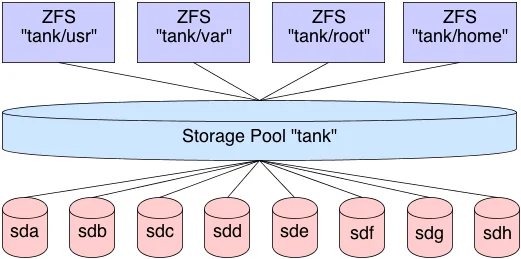
Unlike most file systems, ZFS combines the capabilities of a file system and a volume manager.
This means that, unlike other file systems, ZFS can create a file system that spans a range of drives or a pool.
Not only that, but you can add storage to a pool by adding another drive.
ZFS will handle partitioning and formatting. This means it does integrated volume management.
You don't need LVM and complicated tools to shrink or expand a logical disk.
Copy-on-write
In most file systems, when data is overwritten, it is lost forever.
In ZFS, new information is written to a different block. When the write is complete, the file system metadata will be updated to point to the new information.
This ensures that if the system crashes (or power outage) while the write is occurring, the old data will be preserved. This also means the system doesn't need to run fsck after a system failure.
Snapshots
Copy-on-write leads to another ZFS feature: snapshots. ZFS uses snapshots to track changes in the file system.
"The snapshot contains the original version of the file system and the live file system contains the changes made since the snapshot was taken. No additional space is used. As new data is written to the live file system, new blocks are allocated to store this data."
A file is deleted, the snapshot reference is also removed. Therefore, snapshots are designed mainly to track changes to files, but not the addition and creation of files.
Snapshots can be mounted as read-only to recover a past version of a file. It is also possible to revert the live system to a previous snapshot.
Data integrity verification and automatic repair
Whenever new data is written to ZFS, it creates a checksum for that data.
When that data is read, the checksum is verified. If the checksum doesn't match, ZFS knows that an error has been detected. ZFS will attempt to automatically correct the error.
RAID-Z
ZFS can handle RAID without needing any extra software or hardware.
It's no secret that ZFS has its own RAID implementation: RAID-Z. RAID-Z is actually a variation of RAID-5.
However, it was designed to overcome the RAID-5 write hole error, "in which data and parity information become inconsistent after an unexpected restart".
To use the basic RAID-Z level (RAID-Z1) you need at least two drives for storage and one for parity.
RAID-Z2 required at least two storage drives and two drives for parity. RAID-Z3 requires at least two storage drives and three drives for parity.
When drives are added to RAID-Z sets, they need to be added in multiples of two.
Enormous storage potential
When ZFS was created, it was designed to be the last word in file systems.
At a time when most file systems were 64-bit, the ZFS creators decided to go straight to 128-bit testing to make it more secure.
This means that ZFS "offers 16 billion billion times the capacity of 32 or 64-bit systems".
In fact, Jeff Bonwick (one of the creators) said that powering a "full 128-bit storage pool fill would literally require more energy than boiling the oceans".
How to install ZFS
FreeBSD has native ZFS support. And it's one of the main reasons why some experienced Linux users opt for BSD.
If you want to try ZFS on Linux, Linux allows its use, but not as the root system (/).
If you are interested in trying ZFS on Linux, the ZFS on Linux project has several tutorials on how to do it.
Learn much more about Linux in our online course. You can enroll here with a 7-day free trial. If you already have an account, you can access here.
Like it? Share :-)

Prof. Uirá Ribeiro
Chair do Board do Linux Professional Institute
After years of watching professionals waste hours on simple tasks because they didn't know the right Linux tools, I decided to teach.
Today I'm the author of most of LPI's official Learning Materials and mentor to over 14,000 certified students.
That was just one piece. The course teaches the whole path — from your first command to exam day.

