How to Compile Programs in Linux with GCC: C, C++, and Makefile

A compiler is a special program that processes instructions written in a particular programming language and transforms it into machine language or code.
Usually, a programmer writes instructions in a high-level language such as Pascal or C, using a text editor. The file that is created contains what we call the program source.
The programmer then runs the appropriate language compiler, specifying the name of the file containing the source instructions.
When run, the compiler first parses all the language instructions syntactically one after another and then, in one or more successive stages or "passes," constructs the output code.
Traditionally, the output of compilation is called object code or sometimes object module. The object code is the machine code that the processor can execute.
Traditionally in some systems and languages, an additional step is required after compilation.
This step is intended to resolve the relative location of instructions and data when more than one object module is executed at the same time and they have cross-references to each other. This process is known as linking.
The most widely used compiler on Linux is the GNU Compiler Collection - GCC. It compiles ANSI C code, as well as C++, Java, and Fortran. GCC supports several levels of error checking in source code, produces debug information, and can also optimize the resulting object file.
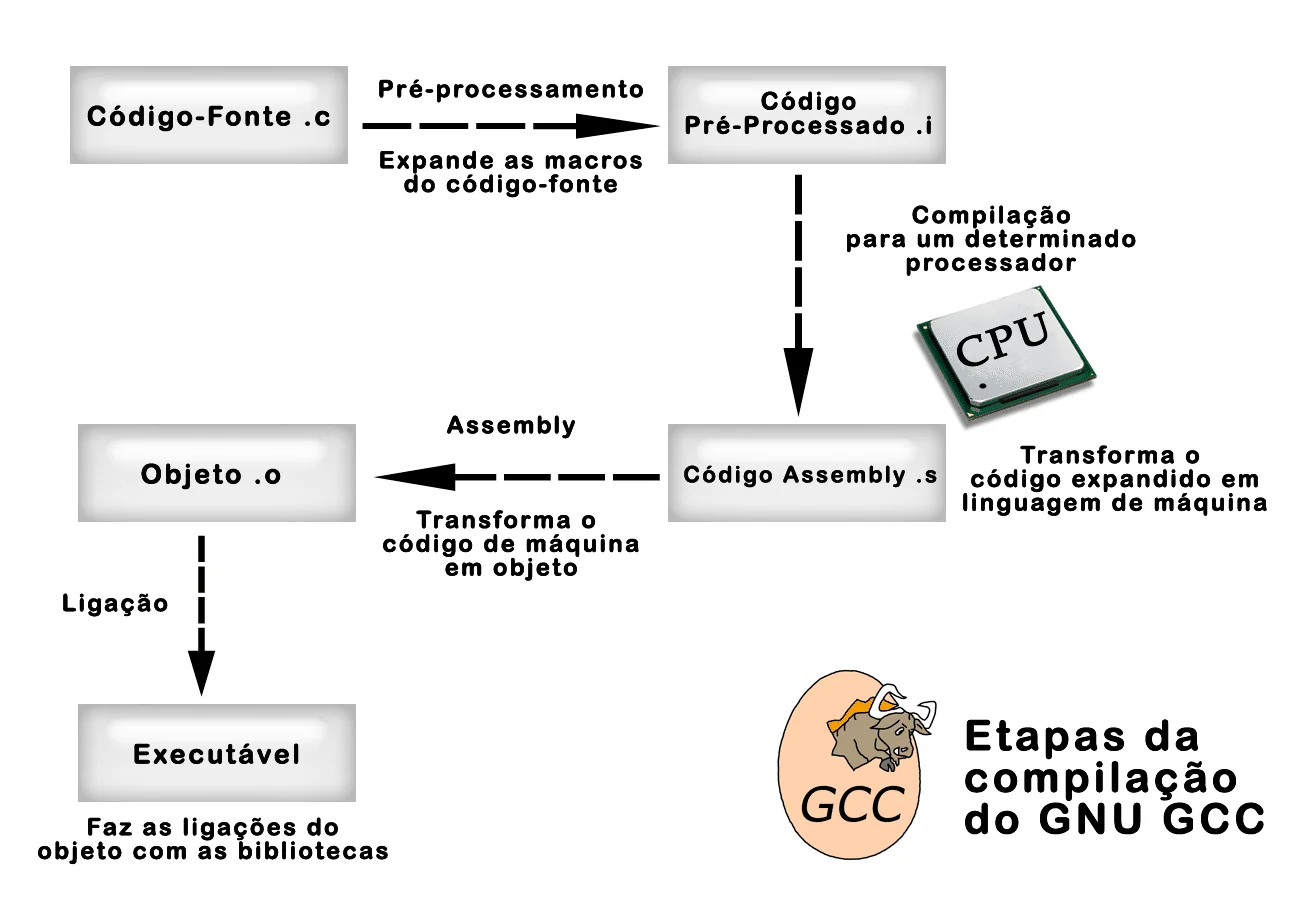
Compilation involves up to four stages: preprocessing, actual compilation, assembly, and linking, always in this order.
GCC is capable of preprocessing and compiling multiple files into one or more assembly files.
The assembly file generates one or more files called object files, and these are linked to libraries to become an executable file.
PREPROCESSING
Preprocessing is responsible for expanding macros and including header files in the source file. The result is a file containing the expanded source code.
COMPILATION
The next stage called "actual compilation" is responsible for translating the preprocessed source code into assembly language (machine language) for a specific processor.
ASSEMBLER
The next stage is called assembler. At this step GCC converts the machine code of a specific processor into an object file.
If there are external function calls in this code, gcc leaves their addresses undefined to be filled later by the linking stage.
LINKER
The final stage called linking, or linker, is responsible for linking object files to create an executable file.
It does this by filling in the addresses of undefined functions in the object files with the addresses of external operating system libraries.
This is necessary because executable files need many external system functions and C libraries to run.
Libraries can be linked to the executable by filling in the addresses of the libraries in the external calls or statically when the library functions are copied into the executable.
In the first case, the program will use shared libraries and will be dependent on them to function.
This scheme saves resources, because a library used by many programs only needs to be loaded into memory once. The executable size will be small.
However, if the installed library is a different version than what the executable needs, the program will not run until the appropriate version of the library is installed.
In the second case, the program is independent, since the functions it needs are in its code.
This scheme allows that when there is a library version change the program will not be affected. The disadvantage will be the executable size and greater resource requirements.
The GCC - GNU Compiler Collection
The GNU Compiler Collection – GNU compiler collection – are full compilers for the ANSI C language with support for K&R C, C++, Objective C, Java, and Fortran. GCC provides different levels of source code error checking and information for debugging and optimizations of the object program.
It also supports the modern Intel IA-64 processor platform. Version 7.0 includes new C++ APIs and libraries. The manual has also been substantially rewritten and improved.
Preprocessing
Preprocessing is responsible for expanding macros and including header files in the source file. The result is a file containing the expanded source code.
The preprocessing of the simple example below will generate a C file with over 800 lines of expanded code.
See how this simple Hello World style program that prints Linux Certification on the screen looks:
#include <stdio.h>
int main()
{
printf("Certificação Linux!\n");
};
The "-E" option of GCC tells the compiler to only preprocess the source code.
# gcc –E teste.c –o teste.i
Notice that the preprocessed file teste.i generated 841 lines of preprocessed code:
# cat teste.i | wc
841 2074 16879
Compiling in GCC
The next stage called "actual compilation" is responsible for translating the preprocessed source code into assembly language (machine language) for a specific processor.
So that you can see the result of the compilation stage, the "-S" option (uppercase) of GCC generates machine code for a specific processor.
The code below is the preprocessed example above that was compiled into assembly for the Intel Xeon processor:
# gcc –S teste.i
# cat teste.s
.file "teste.c"
.section .rodata
.LC0:
.string "Certifica\303\247\303\243o Linux!"
.text
.globl main
.type main, @function
main:
.LFB0:
.cfi_startproc
pushq %rbp
.cfi_def_cfa_offset 16
.cfi_offset 6, -16
movq %rsp, %rbp
.cfi_def_cfa_register 6
movl $.LC0, %edi
call puts
popq %rbp
.cfi_def_cfa 7, 8
ret
.cfi_endproc
.LFE0:
.size main, .-main
.ident "GCC: (GNU) 4.8.5 20150623 (Red Hat 4.8.5-28)"
.section .note.GNU-stack,"",@progbits
Assembler of the Code in gcc
The next stage is called assembler. At this stage GCC converts the machine code of a specific processor into an object file. If this code contains external function calls, gcc leaves their addresses undefined to be filled in later by the linking stage.
The following command will compile the assembly code from the previous example into machine code:
# as teste.s -o teste.o
The as command is an assembler compiler available in the GNU GCC package.
The result will be a "teste.o" file containing machine instructions from the example with the undefined reference to the external printf function.
The "call printf" line in the assembly code indicates that this function is defined in a library and should be called during processing.
Linking Code with Libraries
The last stage called linking, or linker, is responsible for linking object files to create an executable file.
It does this by filling in the addresses of undefined functions in the object files with the addresses of external operating system libraries.
This is necessary because executable files need many external system functions and C libraries to run.
Libraries can be linked to the executable by filling in the library addresses at external calls or statically when library functions are copied into the executable.
In the first case, the program will use libraries in a shared manner and will be dependent on them to function.
This scheme saves resources because a library used by many programs only needs to be loaded into memory once. The executable size will be small.
In the second case, the program is independent since the functions it needs are in its code.
This scheme allows that when there is a library version change the program will not be affected. The disadvantage will be the executable size and need for more resources.
Internally the linking stage is very complex, but GCC does this transparently through the command:
# gcc teste.o –o teste
The result will be an executable called teste.
# ./teste
Certificação Linux!
This program was linked to libraries in a shared manner. The ldd command shows which libraries are linked to the executable:
# ldd teste
linux-vdso.so.1 => (0x00007ffd69cff000)
libc.so.6 => /lib64/libc.so.6 (0x00007f8ee7991000)
/lib64/ld-linux-x86-64.so.2 (0x00007f8ee7d5e000)
The libc.so.6 and ld-linux.so.2 libraries are dynamically referenced by the teste program.
The "-static" compiler option copies the external functions from the libraries into the executable:
# gcc –static teste.c –o teste1
The ldd command will report that the teste1 executable has no dynamic links:
# ldd teste1
not a dynamic executable
The difference in executable size is very large. The teste program that uses dynamic linking is 8,279 bytes.
The teste1 is 1,884,604 bytes. Therefore, only use copying libraries into the executable if it is strictly necessary.
Compiling the Right Way
Once the software has been downloaded from the Internet and the contents of its package have been extracted, it is time to compile the source code.
It is very common for developers when creating their software and distributing their source code to include two special files that greatly facilitate the compilation of programs: configure and Makefile.
configure
The "configure" is a script that the developer creates to check if the machine has all the necessary requirements for compiling the software. This usually involves checking if the required compiler exists and if all necessary libraries are installed.
Configure also allows the user to enable or disable some feature of the software at compile time.
You can see the options that configure allows with the "--help" option:
$ ./configure --helpOnce configure is executed, it performs all the checking of programs, libraries, and dependencies needed to compile the software.
$ ./configureIt will create a special file called Makefile, which contains the software compilation directives.
If there is any problem or missing dependency, configure will alert the user so that this dependency can be satisfied, and then configure can be run again, until the Makefile is generated.
~/httpd-2.4.41$ ./configure checking for chosen layout... Apachechecking for working mkdir -p... yesconfigure: Configuring Apache Portable Runtime library...checking for APR... noconfigure: error: APR not found. Please read the documentation.Makefile
Makefile is a file in the form of a script that contains the commands to compile the software, customized for the machine in question, with the options that configure enabled or disabled.
For the software to be compiled, the make utility is needed to read the contents of the Makefile and trigger the software compilation process.
make
The make utility is necessary to compile multiple source code files of a project. It uses a description file usually named Makefile. The contents of this file contain rules that define dependencies between source files and the commands necessary for compilation.
From this description file it creates command sequences that are interpreted by the shell. Usually the gcc compiler is invoked with several options that complete the dependencies of other object files and libraries.
Even the smallest software projects contain several files that have interdependence and the make command and Makefile greatly facilitate the process of compiling software.
To compile the software, simply type make in the current directory of the software project:
$ makeThis way, make will read the Makefile and perform the entire software compilation process.
It is possible for errors to occur during compilation, mainly due to missing libraries or problems in the library versions, which were not anticipated by the developer when creating the configure script.
Once the software is compiled, you can use the make "install" directive to install the freshly compiled software in the appropriate directories in Linux:
$ make installOnce this is done, the software will be properly installed on the system.
Programs that are built this way were generally packaged using a set of programs referred to as autotools. This suite includes autoconf, automake, and many other programs, all of them work together to make a software maintainer's life significantly easier. End users don't see these tools, but they eliminate the pain of configuring an installation process that will run consistently across different Linux distributions.
Learn much more about Linux in our online course. You can enroll here. If you already have an account, or want to create one, just log in or create your user here.
Did you like it? Share

Prof. Uirá Ribeiro
Chair do Board do Linux Professional Institute
After years of watching professionals waste hours on simple tasks because they didn't know the right Linux tools, I decided to teach.
Today I'm the author of most of LPI's official Learning Materials and mentor to over 14,000 certified students.
That was just one piece. The course teaches the whole path — from your first command to exam day.

